


A record of moving our own web services from an always-on AWS server (EC2) to Google Cloud's Cloud Run (Tokyo) and TiDB Cloud Starter, covering the evaluation, backups, parallel running, the DNS switchover, changes in cost and operations, trade-offs, and a checklist for deciding whether it suits your company.
In early October 2026, we at SolanaLink Co., Ltd. moved a handful of our own web services, including our corporate website, from an always-on server on AWS (EC2) to Cloud Run on Google Cloud (Tokyo region). At the same time, we switched our database to TiDB Cloud Starter, a serverless database.
In this article, we describe as concretely as we can how we evaluated the migration, how we kept the risks down, and roughly how much our costs went down. We hope it gives you material to judge whether this approach fits your own company.
1. Background: the cost structure problem when small and medium-sized businesses run EC2 around the clock
EC2 is a virtual server provided by AWS. It is like renting your own dedicated computer in the cloud: as long as it is switched on, you pay for it, whether anyone is visiting or not.
Web services at small and medium-sized businesses often look like this:
- Traffic is concentrated in business hours, and there is almost none at night or on weekends and holidays. Even so, the server runs 24 hours a day.
- On top of the server itself, the load balancer (a device that distributes incoming traffic), storage, network and logs cost an almost fixed amount every month.
- Maintenance work, such as OS updates, security patches, managing disk space and running the database, falls on a one-person IT team or the developers.
- Because several services share one server, it is hard to tell how much each service is costing.
We had the same structure. To give the conclusion first: we expect the cost of our own services to go down by about 70% on a monthly basis. Until the actual Google Cloud billing data arrives, part of the post-migration figure includes estimates. One point stands out: because several services shared one server, moving only some of them barely reduces the AWS bill. Costs only drop significantly once you can shut down the server and the load balancer. We confirmed this in our evaluation beforehand and set "finally shutting down the server" as our goal.
2. Inventory and technical evaluation: checking the fit with Cloud Run
Cloud Run is a service that runs containers (a box that packages an application together with the environment it runs in) only when requests come in. When there is no traffic, it scales down to zero instances, and you are charged only for what you use (pay for what you use, so-called usage-based billing). However, not every app runs on it as-is, so we first checked the following points one by one.
| Area | What we checked | Our result |
|---|---|---|
| Stateless (no state kept on the server) | Is data lost when the app restarts or the number of instances changes? Are files saved on the server itself? | Images and similar files were already in external storage, so no problem there. We revisited the design of temporary data that had been held in server memory |
| Listening port | Does the app listen on the port number that Cloud Run specifies? | Already supported; it worked as-is |
| Background processing | Is there any processing that keeps running after the response is sent? | Needed fixing. Several processes, such as audit logs, were written asynchronously after the response. Because Cloud Run throttles the CPU after the response, those writes could be lost, so we changed them to wait for completion before responding |
| Resident programs and scheduled jobs | Is there a scheduler that keeps running inside the server? | We moved scheduled jobs to an external mechanism and now run them with Cloud Scheduler |
| Request timeout / WebSocket | Are there connections that stay open for a long time? | Our support chat used server-sent events (a connection that stays open). Because billing continues while a connection is open, we designed each connection to close after at most 5 minutes and reconnect automatically. Services built around real-time communication need special care, because time-based charges tend to grow |
| Cold start | Is the first request slow when there has been no traffic? | Yes, it is slower. Results and countermeasures are in "7. Results" |
There was one more point that is easy to miss. During the inventory, we found that a job that was supposed to run on a schedule in the old setup had in fact not been running, because of a configuration mistake. A migration is also a good opportunity to uncover this kind of job that you "think is running".
What we did not migrate, and why
We did not move everything to Google Cloud. We kept the following on AWS.
- DNS (Route 53): Domain name resolution. The benefit of moving it was small, while a mistake would take down both the company website and email at the same time, so we decided not to touch it.
- Email sending (SES): We have built up trust as a sender (sending reputation) based on our sending history, and authentication is already set up. There was no reason to move it.
- Storing and delivering static files such as images: These were already running reliably, and moving them would not reduce costs, so we left them as they are.
- CDN (a mechanism that speeds up delivery): In this migration, we placed it in front of Cloud Run. This let us issue the HTTPS certificate in advance and avoid an interruption during the switchover.
As for the database, we originally planned to choose Cloud SQL (Google Cloud's managed MySQL). However, because it comes with a fixed monthly cost, we put cost first, tested TiDB Cloud Starter, and adopted it. Some features (full-text search, including Japanese text) work differently from MySQL, so we had to rewrite the search logic. In testing, we loaded the same data into both MySQL and the new database and compared them. When we searched using the titles and keywords of the articles we checked, the two were equivalent in whether those articles correctly appeared in the results. The ranking order does not match, so we plan to check it against real queries after the switchover.
3. Architecture after the migration
Before (pre-migration)
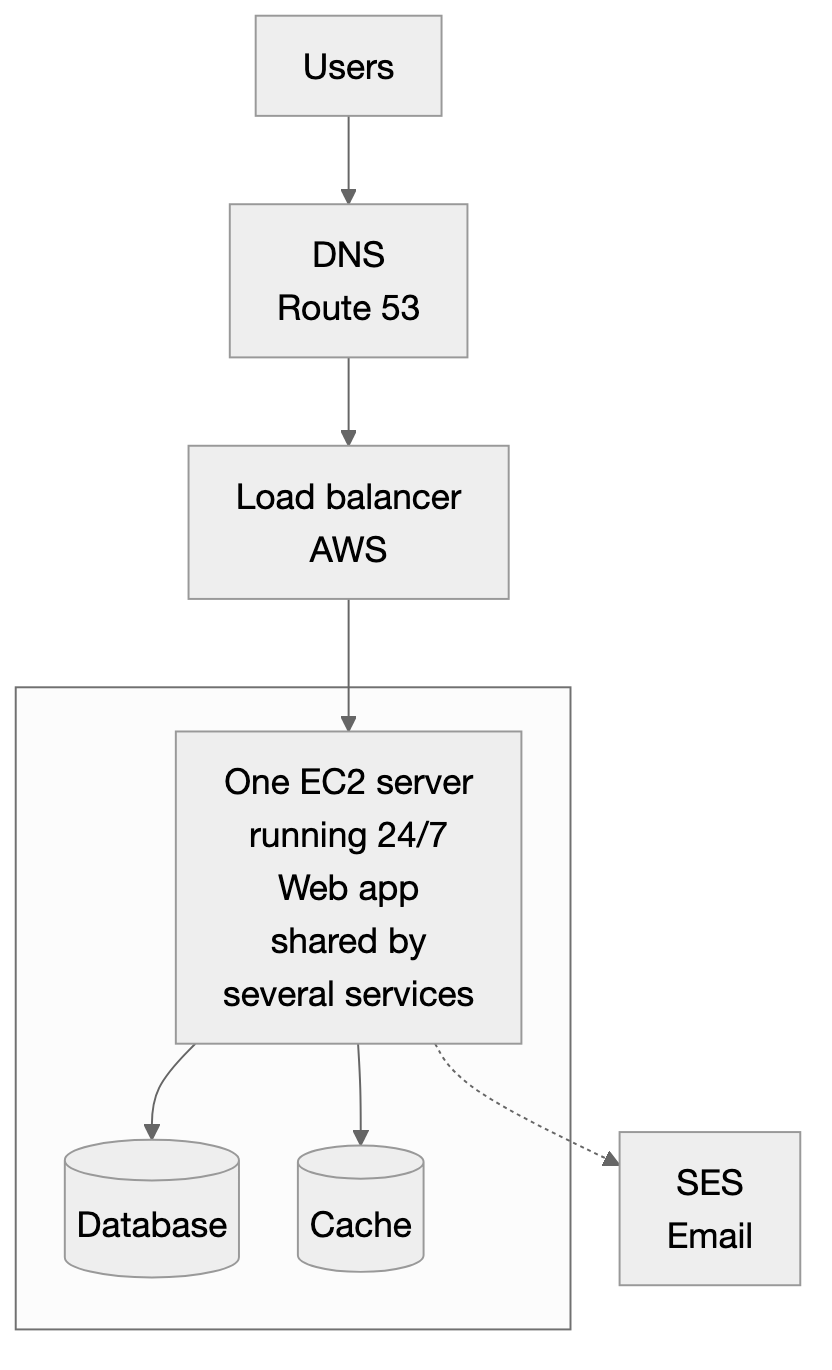 Before: one EC2 server running 24/7, shared by several services
After (post-migration)
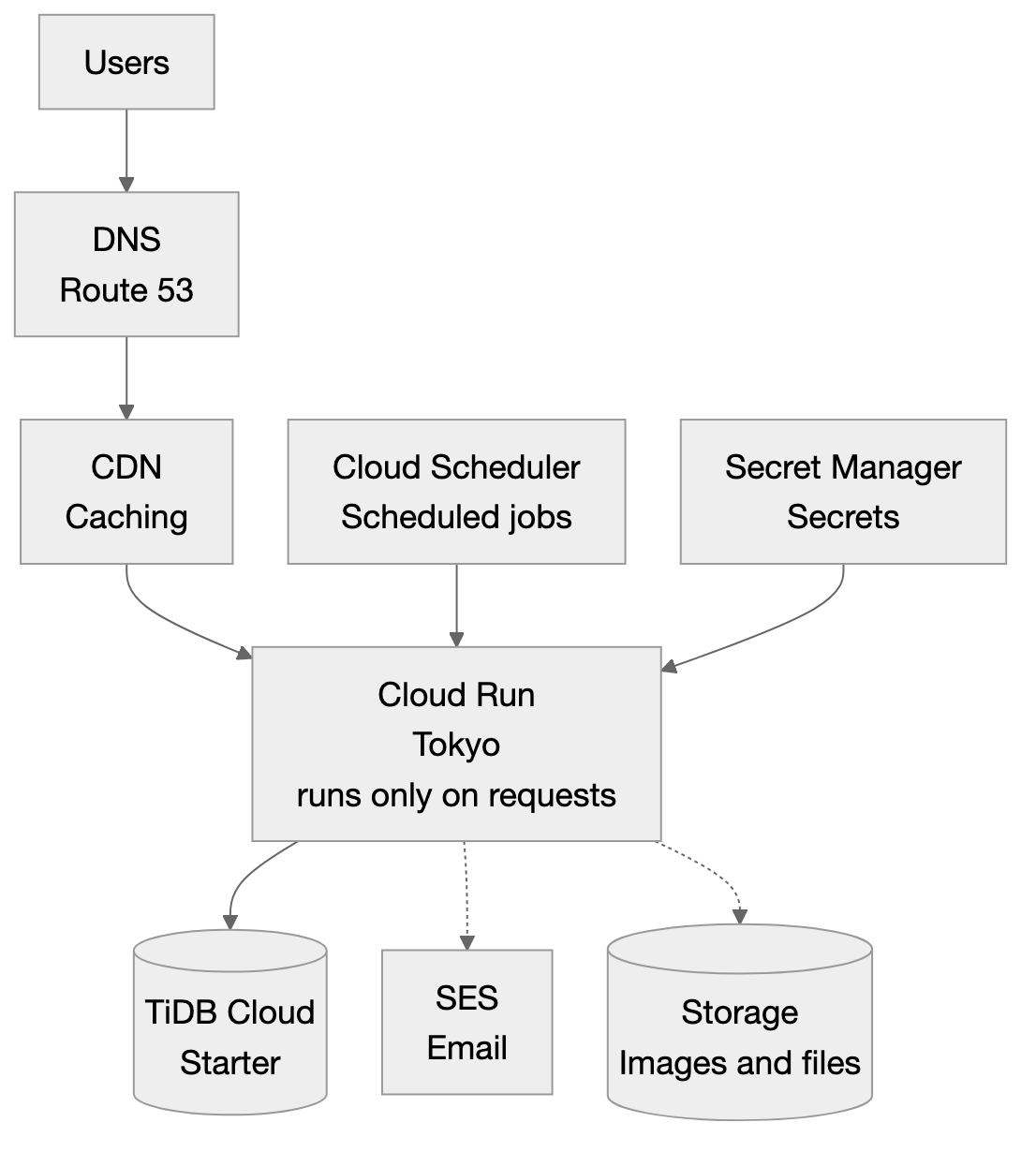 After: apps on Cloud Run, database on TiDB Cloud Starter; DNS and email stay on AWS
Why we split the roles: the right tool for each job
This setup is not the result of choosing either Google Cloud or AWS. It is the result of placing each role where it fits best.
- Running the apps on Cloud Run: You pay only for what you use, which suits services with little traffic.
- DNS on Route 53: It runs reliably and has years of operating history behind it. The switchover steps (adjusting the TTL, rolling back) only require rewriting records.
- Email on SES: We can carry over our sending settings and reputation as they are.
This is not a story of leaving AWS because it is expensive. Using EC2 by "renting it nonstop, 24 hours a day" simply did not match our level of traffic. AWS has the strength of letting you keep using the parts you need, as in this case. Splitting by role turned out to be better for both cost and safety than consolidating on a single cloud.
4. Data backup
What we backed up, and how
- Before migration: Just before the switchover, we took a dump (a file containing all the data) of the production database. The data volume is small, only a few MB after compression.
- Checks during migration: We loaded the dump into TiDB and confirmed that the row counts of all tables matched the original. Just before the switchover, we took the latest data again, loaded it, and ran the same check. We also confirmed that the contents of the main tables matched by comparing checksums. At that point, a single page-view record that came in between the old and new copies showed up as a difference, which was expected.
- After migration: We use TiDB Cloud Starter's automatic backup (once a day). We confirmed in the management console that the retention period is 14 days.
- Data in the old environment: Until the old environment was shut down, we kept its database data in place. We also keep the dump taken before the switchover on hand.
Did we test restoring?
- We have done a "restore from the dump": loading the pre-switchover dump into a separate (test) database and checking its contents. The row-count comparison and the search-result comparison above are the record of that.
- On the other hand, we have not yet done a drill of actually restoring from TiDB's automatic backup.
We are also aware of the following limitations.
- Starter has no point-in-time restore (a feature that rolls back to a specific moment), and restoring creates a new cluster.
- We considered exporting every night to a separate storage location, but decided against it to keep costs down. The automatic backup is our only backup.
- After the old environment is shut down, there is no way to go back to it. Backups actually become more important after the migration.
One lesson from our own case is worth stating: "a backup only becomes usable once you have restored from it." Running a restore drill after the migration remains an open task for us.
5. Running in parallel
We ran the old environment (EC2) and the new environment (Cloud Run) at the same time, before and after the switchover. This period was October 3–4, 2026. We shut down the old server on the night of October 4. AWS's daily billing data also confirms that no server or load balancer costs have been incurred since the 5th.
Here is what we did during this period.
- Testing before the switchover: Without changing the public DNS, we accessed the new environment directly to check that it worked (a method where only our own devices resolve the name to the new environment).
- Final data sync: Just before the switchover, we copied the latest contents of the old database into the new environment. The import finished within a few tens of seconds, and we confirmed that the row counts of all tables matched.
- Checks after the switchover: We repeatedly checked that every page at the public URLs responded normally, that the post-login redirect address was correct, that HTTP was forwarded to HTTPS, and whether there were any server errors. Right after traffic reached the new environment, we also confirmed that there were no new writes to the old database.
- Preparing for a gap in writes: For about 1–2 minutes, from the data sync until the DNS switch reaches everyone, data might still be written to the old environment. We confirmed beforehand that the volume would be small, and our procedure was to check the old database after the switchover and re-enter anything we found by hand.
- Checks as a user: The person in charge actually used the production environment to check it.
- Login: On the morning of the switchover, we confirmed that signing in with a Google account and two-step verification worked normally.
- Contact form: During the checks, we found a bug that had existed since before the migration and fixed it the same day. Post-switchover checks are not only for verifying the migration itself; they are also a chance to find problems that were already there.
We kept the old environment on standby for about one day after the switchover, ready to switch back at any time. Note that there was no period when both environments actually accepted user traffic at the same time. The approach was "test on the new environment, then switch over, with the old environment on standby".
6. DNS switchover
DNS is "the system that maps domain names to server addresses". In a switchover, the focus is on how to shorten the time it takes for the updated address to spread around the world.
- Lower the TTL in advance: TTL is how long other servers remember a DNS answer. More than one hour before the switchover, we lowered the TTL of the www record from 3,600 seconds to 60 seconds. The root domain (without www) uses a Route 53 alias record, whose TTL is fixed at 60 seconds to begin with. We worked out the time when every old cached answer would have expired before switching, so the change took effect within a few minutes after the switchover.
- Issue the certificate first: We finished issuing the HTTPS certificate before the switchover, so there was no period when HTTPS was unavailable. With a method called "Cloud Run domain mapping", which we tried on another service, issuing and propagating the certificate caused an interruption of about 25 minutes, so we did not choose that method for our main site.
- Check CAA records: A CAA record is a DNS record that specifies which certificate authorities are allowed to issue certificates for a domain. Our domain has no CAA record, so certificate issuance cannot be blocked by CAA. If you have CAA set up, you need to add the certificate authority used by the new environment to the allowed list.
- Do not touch email-related records: We did not change any email-related records, such as MX, SPF, DKIM and DMARC, or any of the records used to verify domain ownership. We only changed the two records used to display the website. This avoided any impact on sending and receiving email.
- Rollback procedure: If there is a problem, we point the two records back to their original destinations. With a TTL of 60 seconds, this takes effect in about a minute. If the problem is only on the Cloud Run side, a single command sends traffic back to the previous version (revision). However, data written to the new database after the switchover does not exist in the old database, so if you roll back after real users have started using the new environment, you need to export that data first.
- After the switchover: After about a day of stable running, return the TTL to its original value and shut down the old environment. Our plan was not to delete shared components such as the load balancer at that point, but only to remove the parts for the services concerned. The TTL for www is now back to its original value (3,600 seconds).
7. Results
Cost
For our own services, costs went down by about 70% (monthly estimate). Until this is confirmed by actual Google Cloud billing data, part of the post-migration figure includes estimates.
The comparison is based on the following conditions.
- Before migration: Our own services' share of the AWS costs for compute, load balancing, storage, network traffic and logs in September 2026, the last full month of billing before the migration.
- After migration: Our own services' share of the actual run rate in October 2026, converted to a full month. This includes Google Cloud costs and the managed database costs. It also includes costs for our own services that were not running on AWS, so the comparison is deliberately on the strict side.
- Route 53 and SES stayed on AWS, so they are not included in either the before or the after figures.
- We use a single currency and a single exchange rate throughout.
- How we calculated our own services' share: Before the migration, one server and one load balancer were shared by several services, so the bill cannot be split by service. We therefore divided the pre-migration cost evenly by the number of services. Since we do not know how much each service actually used, this split is an assumption, and the reduction rate would go up or down depending on how the cost is divided.
Because we do not yet have a full month of post-migration billing, we call this a "monthly estimate". We will update this article once the numbers for a full month are available.
Cloud Run has a free tier, which pushes the post-migration cost down. Assuming there were no free tier, we expect the reduction rate to drop by a few percentage points, to just under 70%.
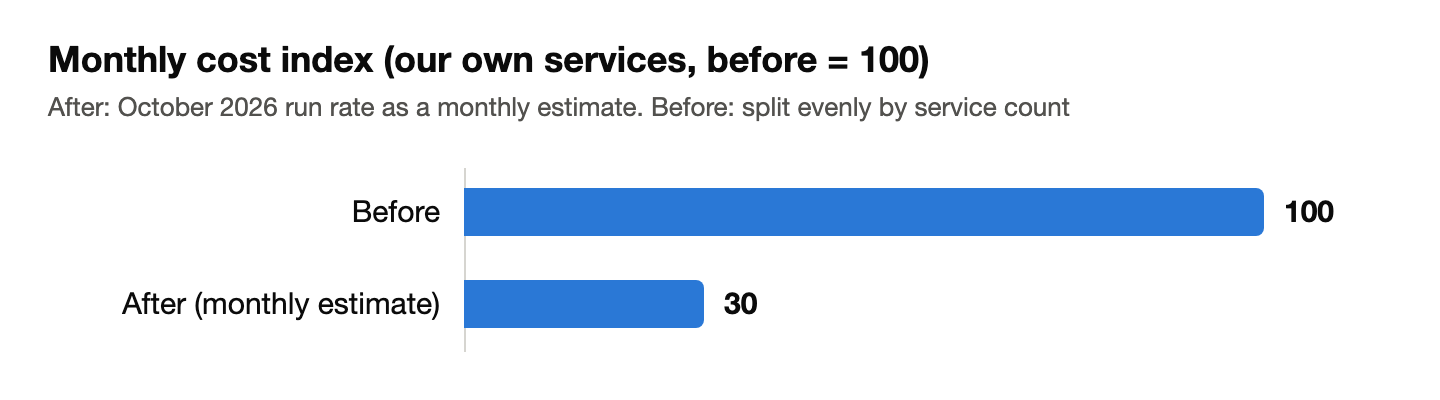 Monthly cost index (our own services): before 100, after 30 (monthly estimate)
| Index | |
|---|---|
| Before migration (September 2026) | 100 |
| After migration (October 2026 run rate, converted to a month) | 30 |
Operational changes
- No more OS patching: Google takes care of updating the server OS and middleware.
- Deployments (publishing) became gentler: Previously we built the app on the production server, so responses slowed by a few seconds during builds, and every release caused an interruption of about 9 seconds. After the migration, the new version starts up first and traffic then switches over, so there is no interruption.
- Rollback became a single command.
- Scheduled jobs now run on time, as scheduled.
- No more managing the number of servers. There is also no need to monitor or expand disk space.
- Sensitive information can now be managed in a dedicated vault (Secret Manager).
Trade-offs
- Cold start: After a period with no traffic, the number of instances drops to zero, so the first request after that is slow. In our measurements, the first page load after idling took about 5 seconds, and around 0.2 seconds after that. Some services were expected to take more than 10 seconds. Most of that time is spent on the first connection to the database (the encryption handshake). As a countermeasure, there is a setting that keeps one instance always on standby, which adds a fixed cost. Another option is to turn it on only temporarily, on days with a review or a sales demo.
- Usage-based billing is harder to predict: Serverless databases charge according to the volume of reads and writes. In our case, uptime-monitoring requests increased database queries more than we expected and accounted for most of our usage. Setting a monthly cap is important, but once the cap is reached the database stops accepting new connections, so the cap and the way you monitor it need to be designed together.
- Limited to a single instance: Instead of using a cache server, we chose an in-process substitute and a setup that runs at most one instance. This is fine for low-traffic services, but it is not suited to handling growth by adding more instances.
- The migration work itself: Code changes were needed (processing after the response, log format, database connection settings, and rewriting the search logic).
- No going back to the old environment: Once the old environment is shut down, you rely on backups.
8. Self-check list: is this migration right for your company?
Companies it suits
- Traffic is low, or varies a lot by time of day or day of the week.
- Most of your current server costs (EC2 or similar) are fixed costs.
- You can move all the services that share one server together and shut down the old server.
- Your app can be containerized, or already runs in containers.
- Sensitive information such as passwords and API keys can be kept out of the container image and passed in at runtime from a dedicated vault.
- You have few maintenance staff in-house and want to reduce the work of OS updates and server monitoring.
- A cold start of a few seconds is acceptable, or you can pay to keep one instance on standby at all times.
- You can build backing up your data after the switchover, and test-restoring it, into your regular operations.
Companies it does not suit (or that should consider it carefully)
- Your service centers on always-open connections (such as WebSocket), so charges grow with connection time.
- You have heavy, steady traffic 24 hours a day. Running an always-on server can be cheaper.
- Your app keeps state in files or memory on the server, and it would be hard to rebuild.
- You depend on processing that continues after the response, or on resident programs.
- Your database relies heavily on specific MySQL features (TiDB requires a compatibility check).
- You cannot keep a way back to the old environment after the switchover, and your backup operations are not in place either.
- The AWS services you use are tightly linked to each other, so you cannot carve out just one.
If even one item makes you uneasy, we recommend using a cost assessment to get the full picture before you migrate.
9. Coming next
Next time, we will share how we evaluated whether to consolidate several TiDB instances into a single Cloud SQL instance, and what we actually did. Reducing the number of instances may reduce the management work. On the other hand, the pricing structure changes, and the impact of an outage can spread wider. Consolidation is not always the right answer. We plan to lay out the pros and cons neutrally and report the results as they are. Please note that we are not promising that costs will go down.
10. Contact us
SolanaLink Co., Ltd. is preparing to offer a "cloud cost assessment" for small and medium-sized businesses. We will organize your current setup and the breakdown of your bill, and check together with you whether a migration is a good fit, how much to move, and where the risks are.
For inquiries, please use the contact page on our official website.
SolanaLink Co., Ltd. (Author: Tony Cai)
Disclaimer: The figures in this article come from our own case, and results vary by environment. The cost reduction rate is for our own services only, and is an estimate converted to a monthly figure from the actual run rate as of October 2026. The pre-migration cost is divided by the number of services. We will update this article once a full month of billing is finalized.
Comments
Comments (0)